PowerFlex
- 4.7
- Rating
- 50.00K
- Installs
- Free
- Price

 Analysis by App-foxy
When I first looked at PowerFlex, I approached it as a practical tool rather than another general electric-car app. Its purpose is narrow: it is built for charging an electric vehicle at PowerFlex Adaptive Charging Stations. That focus is important, because the app makes the most sense when your daily routine already brings you to one of those stations. If you are trying to manage every charger you may encounter on a long road trip, a broader charging service may fit better.
In my experience, the useful question is not simply whether the app is well rated. The better question is whether it matches the charging situation in front of you. You arrive at a workplace, apartment building, parking facility, or another location with a compatible station, and you want to turn a parking stop into a charging session without unnecessary guesswork. That is the workflow this app is designed to support.
From arriving at the station to finishing the charging session
I find the most useful way to judge this routine is to separate the time spent at the charger from the time spent on the phone: the app’s role is to guide a compatible session, not to make the car charge faster. I’d keep the station label in view and check that the selected unit matches before starting. That practical baseline leads into how the workflow holds up when a parking stop is busy or interrupted.
You May Also Like

 Google Keep - Notes and lists
Google Keep’s Quiet Growth Shows the Appeal of Simpler Notes
As mobile work gets busier, Google Keep keeps winning a simple contest: capture a thought quickly, find it later, and get on with the day.

 Blood Strike: 2.5 Anniversary
Blood Strike’s Loadouts Turn Every Drop Into a Tactical Gamble
A close look at Blood Strike’s custom loadouts: how fast access to signature weapons reshapes its battle royale rhythm, rewards preparation, and narrows the gap between fights.

 Pandora - Music & Podcasts
Pandora’s Music Is Easy to Start, but Harder to Recover
Pandora’s strength is its low-effort path from a seed to a station. Its weak spot is how much confidence it asks you to place in connection, setup, and quiet recovery.

 8 Ball Pool
 Is Built on Rivalries, Rematches, and Routine
A close look at the rivalries, rematches, shared routines, and unanswered safety questions that turn a quick pool match into a persistent mobile community.

 Samsung Music
’s Quiet Strength Is Playing What You Already Own
Its reach comes less from spectacle than from dependable access to a personal library. That simplicity is both the app’s strongest retention engine and its ceiling.

 AccuWeather: Weather Radar
AccuWeather Review: A Quick, Clear Forecast for Everyday Decisions
For everyday plans, the best forecast is the one you can understand quickly. AccuWeather makes rain timing, radar, and local conditions easy to act on, with a few trade-offs.
More From Our News Desk



The starting condition matters more than the download
Before installing anything, I would first check whether the place where I regularly park uses PowerFlex equipment. This is the first practical handoff in the experience: the app cannot make an ordinary charger part of its network. Its value begins when the physical station and the mobile software belong to the same charging setup.
That makes it particularly relevant for drivers with a repeated destination. Someone who charges at home most of the time but visits a PowerFlex-equipped office every weekday has a clear reason to keep the app ready. The same applies to a resident whose building offers these stations or a worker who leaves a car parked for several hours. In those cases, the app is tied to a predictable part of the day rather than being used only during an emergency.
The application is free, which removes one barrier to trying it. It is listed for Everyone, and it runs on Android devices using version 7.0 or later. I appreciate that the entry requirement is not aimed only at people carrying the newest phone. Still, compatibility is only the technical starting point; the real test is whether the specific station you need is part of the PowerFlex environment.
Finding the right station before plugging in
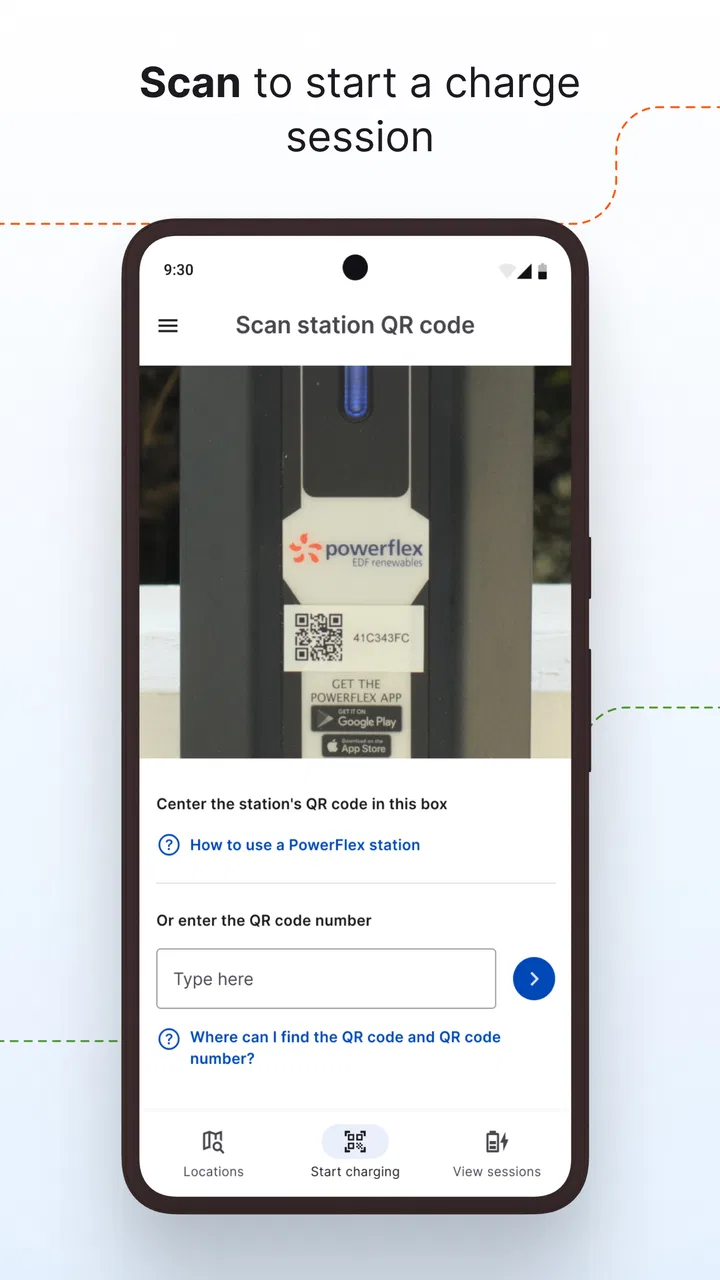
Once I reach a location, I would use the app as a confirmation tool before committing to a parking space. The most useful habit is to identify the intended station first, then compare what I see on the phone with the label or number on the physical unit. That small check can prevent a frustrating mistake, especially in a busy parking area where several chargers look similar.
This is one of the less obvious ways to use the app well: do not treat the screen as a substitute for looking at the charger. The software and the hardware have to meet at the same space. If I select the wrong station in the app, the rest of the process can appear to work while the car remains disconnected from the selected unit. Matching the station identity before starting is a simple but valuable piece of discipline.
The app’s role is also easier to understand when compared with ordinary alternatives. A paper sign, a building notice, or a generic map may tell me that charging exists, but those options do not necessarily guide the session itself. On the other hand, a vehicle’s built-in navigation may be better for planning a route across unfamiliar areas. PowerFlex is more useful at the point where I am already at a compatible location and need to interact with that charging setup.
Starting the session without losing track of the handoff
After parking, I would connect the vehicle and then use the app to begin the session associated with the selected station. The handoff here is physical first and digital second: the cable must be connected correctly, and the phone must be directed to the same charger. Keeping those two actions mentally separate makes troubleshooting easier.
If the vehicle does not begin charging, I would not immediately assume the app is at fault. I would check the connector, confirm that the car recognizes the cable, verify the station selection, and look for any visible instruction on the charger. This sequence is more efficient than repeatedly tapping the same control. A charging app can coordinate a session, but it cannot correct a loose connector or a mismatch between the selected station and the one actually being used.
One practical advantage of a dedicated network app is that it keeps the charging interaction in one place instead of forcing me to switch between the car interface, a building portal, and a general-purpose mapping app. That said, the benefit depends on how consistently the location uses the system. If the site has unclear signage or several different charging providers side by side, the simplicity disappears quickly.
Monitoring the stop while the car is parked
Once the session is underway, I would use the app as a way to stay aware of the charging stop rather than treating it as something to start and forget. This matters most when the car is parked while I am working, shopping, attending a class, or living in a building with shared chargers. A quick check can help me decide when the charging task has reached the point where I should return to the vehicle.
There is a useful trade-off here. A focused app can make a repeated routine easier because I do not need a large collection of unrelated travel features. But a focused app may also feel limited if I expect it to replace the car’s energy display, a route planner, or every charging network I use. I see it as a station companion, not as the complete operating system for an electric vehicle.
For a weekday example, imagine arriving at work with enough battery for the morning commute but wanting extra range for an evening appointment. I would park, identify the correct PowerFlex station, connect the car, start the session, and leave the vehicle while I work. Later, I would check the session before heading out, collect the car, and make sure the charging connection has ended cleanly. The app is most valuable in this kind of repeatable chain, where each step has a clear place in the routine.
Ending the session and handing the car back to the road
Finishing is not just a matter of unplugging. I would first confirm that the charging session has ended through the app or the station, then disconnect the cable and return it as required by the location. This closing handoff matters in shared parking because the next driver needs the equipment ready, and because leaving a vehicle connected after the useful part of the stop can create avoidable tension.
I also like to treat the final check as part of the charging record in my own routine. Before driving away, I would look at the vehicle’s battery display and make sure the car is no longer connected. If the app and the car show different states, the physical connection and station indicator deserve attention before I leave. That habit is more reliable than assuming that one screen always tells the whole story.
The outcome I want is simple: the car receives energy during a stop that was already part of my day, and I can leave without turning charging into a separate errand. PowerFlex is well suited to that result when the station is familiar and the process is repeatable.
What the developer’s focused approach gets right
PowerFlex, the developer, has kept the app’s identity closely connected to adaptive charging stations rather than presenting it as an all-purpose automotive toolbox. That narrow purpose helps explain why the app has earned a 4.6 average from around 958 ratings, with more than 50K installs. Those figures suggest that the product has found a real audience among drivers who need this particular charging workflow.
I would not interpret that rating as proof that every charging site will feel effortless. A good score can coexist with location-specific problems, confusing parking rules, or hardware issues. Still, it gives me some confidence that the basic concept is useful to a meaningful group of drivers, especially those who repeatedly encounter the same network.
The current version is 4.4.14, and the app has been available since January 11, 2018. That history makes it feel more established than a newly released experiment. For me, the more important point is that the app belongs to a mature charging routine: drivers are not downloading it to browse a novelty, but to handle a real physical task involving a car, a station, and a parking stop.
Where the workflow becomes inconvenient
The biggest limitation is dependence on the charging environment. If I rarely visit a PowerFlex station, the app may spend most of its time unused. A general charging application can be a better choice for someone who moves between several networks, travels across regions, or wants one place to organize unrelated providers. PowerFlex makes more sense when compatibility is already established by the place where I park.
There is also a human factor. The workflow crosses several boundaries: the driver must understand the car’s connector, the station must be available, the selected unit must match the physical unit, and the parking rules must be followed. Any one of those can interrupt the experience. The app can help coordinate the digital portion, but it cannot remove every source of friction around a shared charger.
I would also avoid relying on any charging app as the sole source of truth during an urgent trip. For a long journey, I prefer a broader planning method that accounts for the route and alternative networks, while using PowerFlex when I arrive at a compatible station. That division of labor is more realistic than expecting one focused app to handle every stage of electric-car ownership.
Another trade-off appears when a driver shares a car with family members or coworkers. The app may be convenient for the person who normally handles charging, but the entire group still needs to understand the physical station and the correct end-of-session routine. A smooth personal workflow can become less smooth when another driver arrives without knowing which charger to select or how the site expects the vehicle to be left.
Who should install it, and who should look elsewhere
I would recommend PowerFlex to a driver who regularly parks at a PowerFlex Adaptive Charging Station and wants a dedicated way to manage that stop. It is especially sensible for workplace commuters, apartment residents, and people whose charging happens during predictable periods rather than on open-road journeys. The free price also makes it easy to test without turning the decision into a financial commitment.
I would be more cautious if my charging life is scattered across many unrelated networks. In that situation, a wider charging app or the vehicle manufacturer’s own tools may provide a more complete overview. I would also look elsewhere if I mainly need route planning, trip estimation, or a broad comparison of charging providers. Those are different jobs from operating a compatible PowerFlex station.
For new electric-car owners, my advice would be to install it only after identifying a real location where it will be used. Then learn the complete sequence during a calm daytime stop: match the station, connect the vehicle, start the session, check the status, and finish properly. Practicing the handoff when the battery is not critically low is much less stressful than learning it during an urgent departure.
My final take after following the complete routine
I see PowerFlex as a practical, specialized app rather than a universal answer to electric-car charging. Its strength is the complete local workflow: arrive at a compatible station, identify the correct unit, connect the car, manage the stop, and leave with the session properly finished. When that situation describes your everyday driving, the focused design is a benefit.
Its weaknesses come from the same focus. Drivers who need broad network coverage, route planning, or a single tool for many charging providers may find it too narrow. The experience also depends on the station, the parking location, and the driver completing the physical and digital steps in the right order.
My recommendation is therefore conditional but positive: if PowerFlex stations are part of your regular routine, this free Auto & Vehicles app is worth keeping on your phone. It does not need to be everything. It only needs to make the compatible charging stop clearer and easier, and for that specific job, it is a sensible companion.
FAQs for PowerFlex
01What is PowerFlex and what are its main features?
PowerFlex is a cutting-edge app designed to enhance productivity by integrating task management, scheduling, and reminders in one platform. It features a user-friendly interface, customizable notifications, and seamless synchronization across devices. Users can set goals, track progress, and collaborate with others, making it a versatile tool for personal and professional use.
02Is PowerFlex available on both Android and iOS platforms?
Yes, PowerFlex is available for download on both Android and iOS platforms. This cross-platform availability ensures that users can enjoy the app’s features on their preferred devices, whether they use a smartphone or tablet. It provides a consistent experience across all devices, allowing for seamless task management.
03Does PowerFlex require an internet connection to function?
PowerFlex does not require a constant internet connection for basic functionalities like task management and reminders. However, features such as cloud sync and collaboration tools require internet access to ensure data is updated and shared across devices. This allows users to work offline and sync data when online.
04Are there any subscription fees or in-app purchases in PowerFlex?
PowerFlex offers a free version with essential features, but to unlock advanced functionalities, users can subscribe to a premium version. The premium subscription includes features like advanced analytics, priority support, and additional customization options. It’s important to review the app’s pricing details to understand the benefits of upgrading.
05How secure is my data with PowerFlex?
PowerFlex prioritizes user data security by employing encryption and secure servers to protect personal information. The app adheres to industry standards for data protection, ensuring that sensitive information remains confidential. Users can also enable additional security measures like two-factor authentication to enhance data security.
Pros
- User-friendly interface for easy navigation.
- Wide range of exercises and routines available.
- Customizable workout plans to fit goals.
- Tracks progress and performance effectively.
- Integrates seamlessly with fitness wearables.
Cons
- Limited free features; subscription needed.
- Occasional bugs causing app crashes.
- Heavy on battery usage during workouts.
- Requires internet for full functionality.
- Some advanced features lack detailed guides.

PowerFlex
Gallery